
If you are:
A Representative in a 2-Tier portal, or
A 3-Tier user with a Vault at the Head Office tier and a role (Admin or Rep) in another Portal tier
You can switch between your Vault view and Portal view without logging out.
Switching ensures you are working in the correct environment before managing vaults or reviewing documents.
Before You Begin
You must have both Vault access and Portal access assigned.
You must be logged into the system.
Step-by-Step Instructions
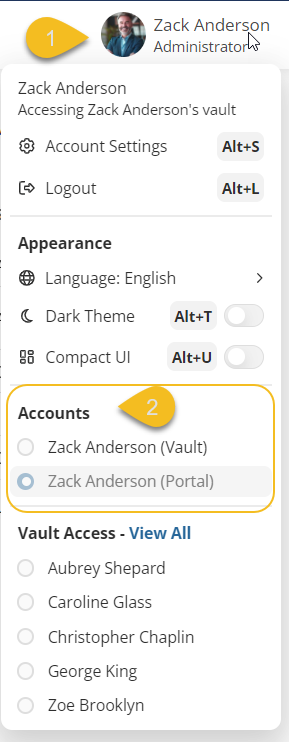
Step 1 — Open the Account Menu
Click your name in the top-right corner of the screen.
Locate the Accounts section in the dropdown menu.
Step 2 — Select the Environment
- Under Accounts, you will see your name listed multiple times. Each listing is labeled by environment:
Vault
Portal
- Click the environment you would like to access.
The system will switch immediately.
Important Behaviour Notes
How to Recognize You Are in the Portal
When you are in the Portal:
The main menu shows the list of all vaults you have access to.
You will see additional administrative tools.
How to Recognize You Are in Your Vault
When you are inside your Vault:
Your name still appears in the top-right corner.
The main menu includes:
Documents
Reminders
Contacts
You will see a folder structure, which may be different from your clients’ vault structures.
You are viewing only that specific vault.